VerwaltKlarVerwaltKlar

Less administrative work per maintenance case.

VerwaltKlar is an intelligent maintenance workflow for professional property managers. It guides missing information, structures the case and prepares it for review and trade business selection.

Fewer follow-up questions. Better-prepared assignments. A traceable case history.

  • No dedicated tenant app
  • Keep using existing trade businesses
  • Assignment stays with the property manager
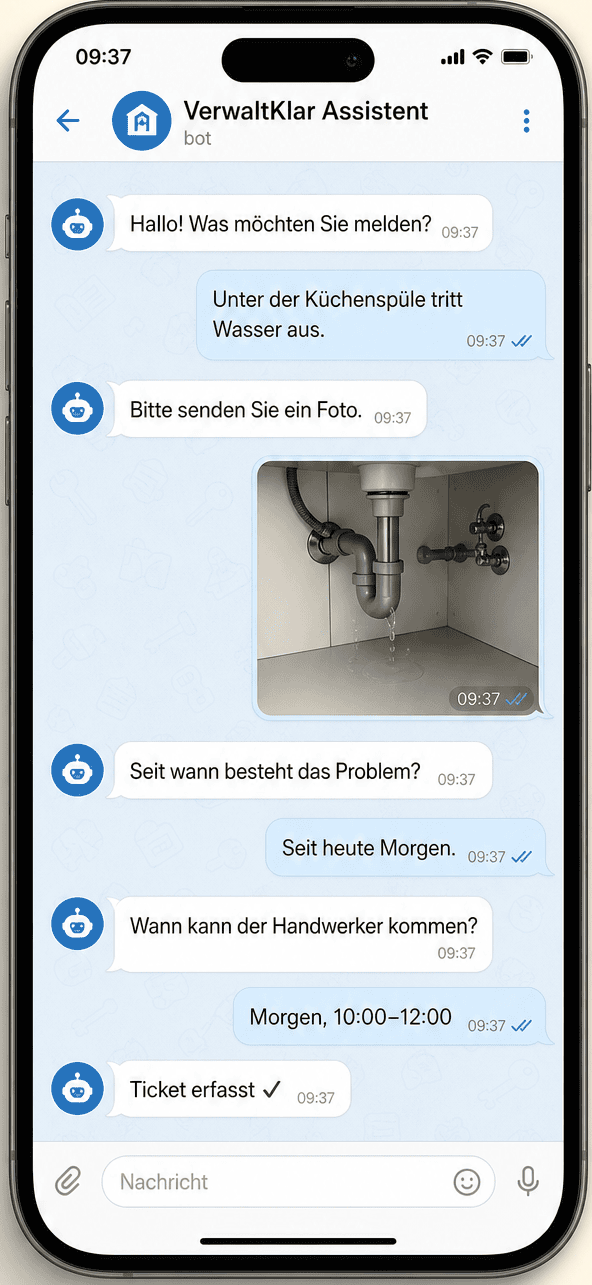
Example of a guided maintenance report in Telegram
TelegramCurrently verified
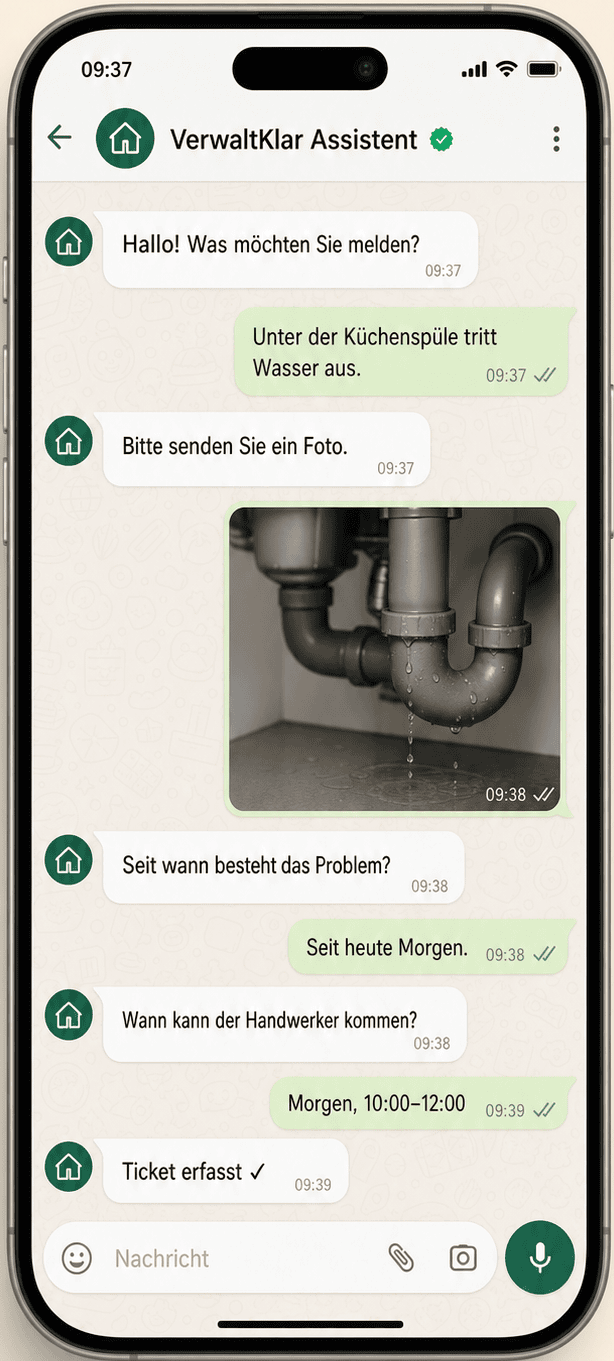
Constructed example of the planned maintenance report in WhatsApp
WhatsAppPlanned for pilot launch

Today's reality

Administrative work builds up in the follow-up chain before assignment.

In this example, even a clear message is still missing details needed for review and assignment.

Tenant messageFictional example
“Hi, since yesterday it has been dripping under the kitchen sink, especially when we use the tap. Someone would be home on Wednesday after 3 pm.”

Without guided intake, the message becomes a follow-up chain

  1. Classify the message
  2. Chase missing details
  3. Retype the information
  4. Coordinate a trade business

Still to clarify before the case can be handled

The message describes the problem, but it is not yet a dependable maintenance case.

  • 01Match the property and unit
  • 02Confirm the affected component
  • 03Capture extent and possible damage
  • 04Request a photo of the leak
  • 05Clarify permission to enter
  • 06Confirm a usable time window

How it works

From a tenant message to a prepared maintenance case.

VerwaltKlar guides the missing details, structures the case and prepares the property manager's decision.

  1. 01

    The tenant reports the issue

    Intake starts with a natural-language message.

  2. 02

    VerwaltKlar asks targeted questions

    The category and problem description are confirmed; photos and availability remain editable until review.

  3. 03

    The case is structured

    Location, component, symptom, start, media and access details are brought together in one case.

  4. 04

    The property manager receives a prepared view

    The structured details and the relevant contract information are ready for professional review.

  5. 05

    The property manager reviews and selects

    They edit the details, review liability where required and assign a trade business.

  6. 06

    The trade business receives the prepared case

    The information relevant to this stage is passed on as a traceable basis for the job.

Static product walkthrough

One case, six visible steps.

This representation follows the current intake flow and shows the same fictional case from the free-text message to human assignment.

  1. Step 01
    Current behaviourConstructed example

    Initial report

    The case starts with a free-text message, not with an already complete ticket.

    “Hi, since yesterday it has been dripping under the kitchen sink, especially when we use the tap. Someone would be home on Wednesday after 3 pm.”
  2. Step 02
    Current behaviourConstructed example

    Guided clarification

    The category and problem description are confirmed; a missing location or unclear details trigger targeted questions.

    I detected a plumbing issue. Is that correct?

    Yes, plumbing.

    Where exactly does the water appear, and when does it happen?

    Under the kitchen sink, mainly when the tap is running.

  3. Step 03
    Current behaviourConstructed example

    Photos and access

    The tenant can add photos, set entry permission and select concrete availability windows.

    CC0 example photo of pipework beneath a sink
    1 of up to 4 photosCC0 example photo
    Entry without the tenant present
    Permitted
    Preferred time window
    Wednesday · 3–5 pm
  4. Step 04
    Current behaviourConstructed example

    Tenant review

    A summary appears before submission. The description, media and availability remain editable.

    Summary before submission

    Description
    Water appears under the kitchen sink, primarily during use, around the pipework or trap.
    Media
    1 of up to 4 photos
    Availability
    Wednesday · 3–5 pm

    Edit details

    Confirm report

  5. Step 05
    Current behaviourConstructed example

    Prepared administration view

    The property manager receives a structured synthetic case view. Urgency is not presented as an AI-derived result.

    Property
    Sample property · Flat 3B
    Category
    Plumbing
    Summary
    Kitchen sink leaks during use
    Description
    Water appears under the kitchen sink, primarily during use, around the pipework or trap.
    Photo
    1 of up to 4 photos
    Entry
    Permitted
    Time window
    Wednesday · 3–5 pm
    Urgency
    Not assigned automatically
  6. Step 06
    Current behaviourConstructed example

    Human action

    Approval applies only where it is required. An authorised person selects and assigns the trade business.

    Liability

    Where required: approve or reject

    Trade business

    Sample Plumbing Services

    Select and assign

    Prepared handover

    Leak under the kitchen sink during use. One photo is attached; entry is permitted and Wednesday from 3 to 5 pm is available.

    No suitable match? The case remains visible and can be assigned manually.

Swipe horizontally to see every step.

What the pilot should improve

Fewer follow-up questions. Better-prepared assignments. A traceable case history.

The pilot tests these outcomes against an agreed baseline.

Fewer follow-up questions
Guided intake confirms the category and problem description and collects the available supporting details.
Better-prepared assignments
Location, symptom, media, access details and availability are brought together in a structured case.
A traceable case history
Status, decisions and the information shared at each stage remain attached to the case.

Assignment stays with the property manager.

VerwaltKlar prepares the case and recommendations. Consequential workflow actions remain bound to the responsible roles.

  1. 01Review or edit the case data
  2. 02Approve liability where required
  3. 03Select and assign a trade business
Security & privacy

Clear roles. Bounded data flows. Human approvals.

Access and sharing follow role and case context. AI prepares information; commissioning and required approvals remain with responsible people.

View the security overview
  • 01Commissioning stays human
  • 02Access follows role and case
  • 03Transparent AI and provider use

Capability status

Core workflow, support and direction.

Each area is labelled as available or as future direction.

Available

Core workflow

Maintenance

The current workflow from receiving a report to handover and status tracking.

  • Guided intake and a structured case
  • Category suggestion and liability information
  • Conditional liability approval
  • Trade business selection and assignment by the property manager
  • Status and case history
Available

Supporting intelligence

Understand context

Information from different formats is made usable for the maintenance case.

  • Multilingual text input
  • Images and documents
  • Relevant property and contract context
Direction

Platform direction

Portfolio building blocks

These possible extensions are not part of the core labelled as available here.

  • Portfolio and asset data
  • Invoices and reporting
  • Integrations and asset history

Let's test the value in a clearly bounded pilot.

In an initial conversation, we clarify whether VerwaltKlar fits your portfolio, team and maintenance process.